Showing posts with label exp. Show all posts
Showing posts with label exp. Show all posts
In each file always has its own properties even image, audio, video and so on. To know about its properties is good for you when you want to use it with you wanted. If you want to design an artwork you will also to know at least the width and the height or before you upload your artwork or design on to the internet you will also need to check the size of your file that does the server allow you to upload it or not. Sometimes some servers determine the width and the height of the image you are going to upload. So to know more details about a file you can follow by this easy step.
 Firstly go to the file that you want to see the properties or details of it and then "Right click" on that file then you will see a menu popup finally you can just simply click on "Properties" and you will see a popup windows to show you about the properties or details of that file. Please see the image below.
READ MORE
Firstly go to the file that you want to see the properties or details of it and then "Right click" on that file then you will see a menu popup finally you can just simply click on "Properties" and you will see a popup windows to show you about the properties or details of that file. Please see the image below. Oh! my icon is too big but sometimes it is too small to me. This might be a sound of a user who had a bad experience with the icon and sometimes it cause of the screen resolution on the computer screen but for this section I would love to talk about the icon sizing. It is short enough for you to learn and practice it. But before you change the icon size or rearrange them you need to make sure that your computer is still at the right screen resolution because if the screen resolution is not right then even you change the icon size but it seems like your desktop's icons are looking wired though.
Please take time and have a look at a very easy way to do so.
 Firstly "Right Click" on the Desktop and then go to "View" then you can choose any size you want.
Have fun
READ MORE
Please take time and have a look at a very easy way to do so.
Firstly "Right Click" on the Desktop and then go to "View" then you can choose any size you want.Have fun
Boom! !
The image on the desktop of your PC sometimes helps you to release your stress also. You can play around with your desktop with the image or the design you want. Some people put their beloved girlfriend or boyfriend so it helps them to be exited to see that image but some people love to just use a color or some design instead.
Anyway, maybe basic users did not know how to change the image on their desktop yet. And today I am going to show how can you do that in just a second. Are you ready?
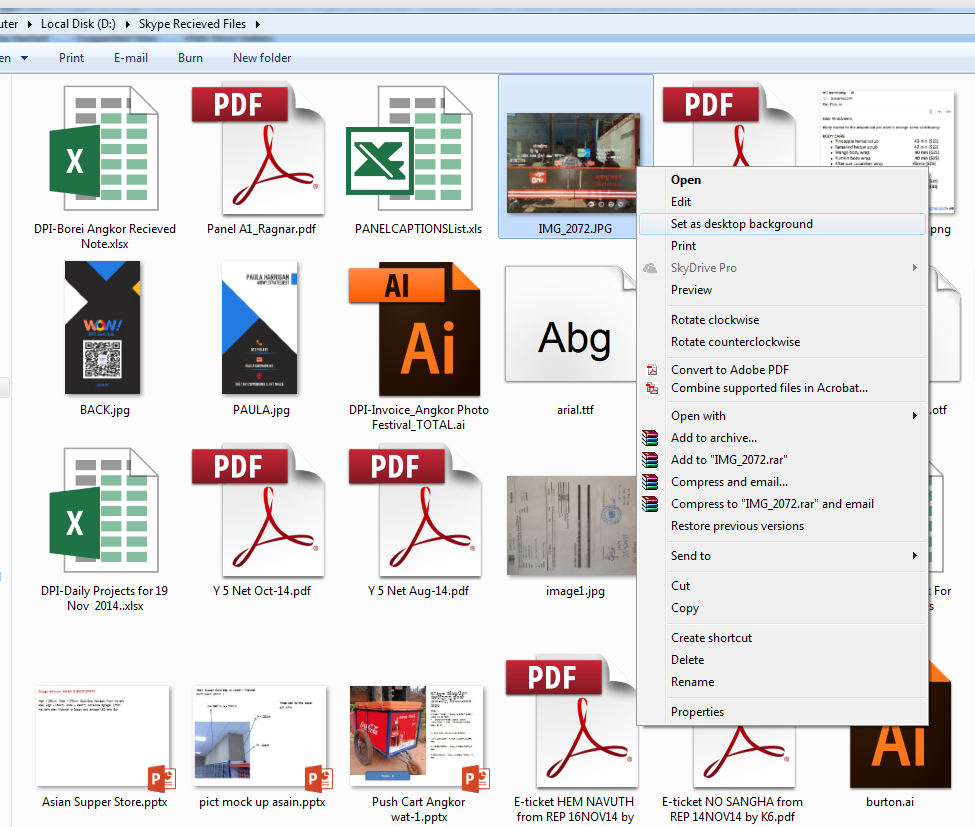 First thing to do is to go to your windows explorer and have a look at any image you want to place on your desktop. then just "Right Click" on the image you want and you will see a menu comes out then choose "Set as desktop background"
READ MORE
The image on the desktop of your PC sometimes helps you to release your stress also. You can play around with your desktop with the image or the design you want. Some people put their beloved girlfriend or boyfriend so it helps them to be exited to see that image but some people love to just use a color or some design instead.
Anyway, maybe basic users did not know how to change the image on their desktop yet. And today I am going to show how can you do that in just a second. Are you ready?
First thing to do is to go to your windows explorer and have a look at any image you want to place on your desktop. then just "Right Click" on the image you want and you will see a menu comes out then choose "Set as desktop background"Some people feel strange when their computer is automatically update the OS and then it takes time to install and reconfigure those settings and files when they are shutting down and turning on. Some people thought their computer is having problem or was attacked by viruses, but it is absolutely not. Then the question is "Is there any solution to stop this? ". YES, there is a solution to this problem. You can just change the setting to do not allow the automatic update. But the other question might be asked "How are we going to stop this?". so the tutorials below will show you how can you do so.
Step one: go to Control Panel
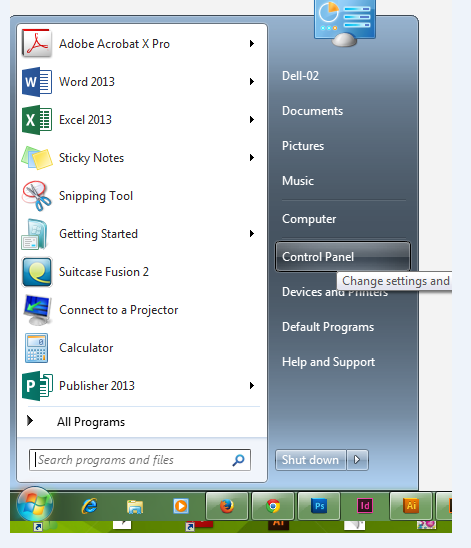
Step two: go to Windows Update


 Finally, Have fun
READ MORE
Step one: go to Control Panel
after that you will see another windows comes and just simply go to Chang setting like show
then on the combo box please choose "Do not .... "
Sometimes, we never think about this but it is a missing of information and sometimes it can be a mistake. Screen resolution is used to manage or determine the pixel and the smoothness of your screen, the frequency of the transaction on the refresh rate, the clearance of the monitor etc. So when you computer is not having a right ratio of resolution, the interface of your screen might look wired and strange and maybe you will think that maybe your computer is broken but it doesn't. If you are a designer, the higher screen resolution is a required to use because you can make a perfect design and faster the rate with a nice preview of your design. Example if your screen resolution isn't work well when you draw a circle then maybe it previewed as an ellipse or something like that.
 That is why I am here today to show you how can you determine the screen resolution and also see some of the tools that can help you around that.
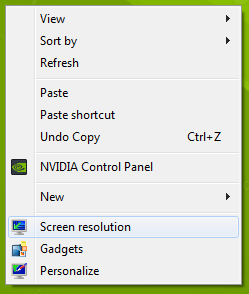
To start with you can just simply "Right Click" on your "Desktop" then you will see a popup menu then just choose "Screen Resolution". please see the picture.
 After you have done the step like shown, you will see a window popup and allow you to play around with your screen and some more tools there like show in the picture. Have fun.
READ MORE
That is why I am here today to show you how can you determine the screen resolution and also see some of the tools that can help you around that.To start with you can just simply "Right Click" on your "Desktop" then you will see a popup menu then just choose "Screen Resolution". please see the picture.
After you have done the step like shown, you will see a window popup and allow you to play around with your screen and some more tools there like show in the picture. Have fun.To have a computer for a daily use is important but to choose a right computer before you buy is more important. The priority of the computer spec. sometimes we can just buy a computer because it is brand and new but we never think about the possibility of it. In a computer there many many of things are combined together so if you want to know how clear your computer spec is then you will need to know the full of system information. I used to show some of the properties and some short of information about the computer spec but here you will more and all the information is collected to put here. Not just hardware information but also software and services. Some people they were having a very hard time to get to know what their computer serial or series number is because it is needed for download the driver or some of support frame work and so on.
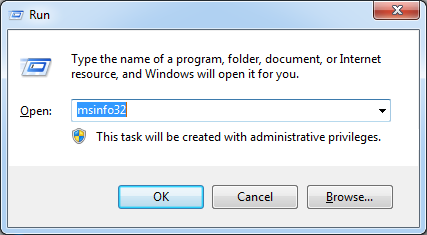 In this post you will know how can you get to it. Firstly you can just simple press a shortcut for short ( Windows Key + R ) then the Run dialog will appear after that you type in the input box "msinfo32" and pres "Enter" from the keyboard or click "OK" button. see the picture
After you done the step above then the window of System Information will appear like this

READ MORE
In this post you will know how can you get to it. Firstly you can just simple press a shortcut for short ( Windows Key + R ) then the Run dialog will appear after that you type in the input box "msinfo32" and pres "Enter" from the keyboard or click "OK" button. see the pictureAfter you done the step above then the window of System Information will appear like this
Sometimes you wanted to know the spec and possibility of your computer to run and how fast can it be run with game or a higher graphical program or movies. So to be sure with your decision before you choose to buy a computer, it is really important to know some of the hardware spec such as Ram size, Page files, CPU, Direct X version and so on.
Today I will show you how you can go through to where it belong.
 To get to it firstly you can just simply go to "Windows Button" then go to "Accessories" and look for the word "Run" see the picture.
Or there is a short way to do that, you can use shortcut instead
(Windows key + R).
After you have done with the steps above you will see this windows popups and show you the information you are looking for. see the picture

READ MORE
Today I will show you how you can go through to where it belong.
To get to it firstly you can just simply go to "Windows Button" then go to "Accessories" and look for the word "Run" see the picture.Or there is a short way to do that, you can use shortcut instead
(Windows key + R).
After you have done with the steps above you will see this windows popups and show you the information you are looking for. see the picture
It is very important to know your computer's properties such as Memory size, CPU size, OS version, or OS type and so on. Now I am going to show you to go see those information in a very simple way.
 So after you turn your computer on you can see there are many icons on the desktop of your screen and on of them called "My Computer". See the picture :
 After you already found this you can just simple "Right Click" from your mouse on to that icon and choose a menu from a popup called "Properties". After that you will see a windows comes out and show you about the information of your computer as I mentioned above. See the picture:
READ MORE
So after you turn your computer on you can see there are many icons on the desktop of your screen and on of them called "My Computer". See the picture : After you already found this you can just simple "Right Click" from your mouse on to that icon and choose a menu from a popup called "Properties". After that you will see a windows comes out and show you about the information of your computer as I mentioned above. See the picture:


